As I’ve mentioned in previous posts, post radiation treatment for prostate cancer (I”m doing okay so far; as always, we keep monitoring), I’m having a little trouble emptying my bladder completely, so my urologist has put me on a “timed evacuation schedule”, or “go pee every two hours”.
[Side note: prostate cancer is a very undignified disease. I have had many ultrasound probes in my bum, injections right below my scrotum (and the experience of exam stirrups — you have my sympathies if you go to a gynecologist)…talking about urinating on a schedule is mild.]
Now for a human being, that’s seems like a simple directive. You get up in the morning, go pee, wait around two hours, pee again, and so on until you go to bed, with whatever else is going on and life happening as usual. Repeat.
As I have mentioned, however, I am extremely time-blind, so having something remind me (and track my compliance) is very useful. Trying to turn “every two hours” into a flexible algorithm, however, is non-trivial.
The medical basis
First, let’s break down what the urologist really means and wants you to do when they say, “I’d like you to start urinating every two hours”. There’s quite a bit of literature on the subject of timed voiding, and I’ll post a few links here as a starting point.
Wallace, S. A., Roe, B., Williams, K., & Palmer, M. (2004). Bladder training for urinary incontinence in adults. Cochrane Database of Systematic Reviews, (1). https://doi.org/10.1002/14651858.cd001308.pub2
Wyman, J. F., Burgio, K. L., & Newman, D. K. (2009). Practical aspects of lifestyle modifications and behavioural interventions in the treatment of overactive bladder and urgency urinary incontinence. International Journal of Clinical Practice, 63(8), 1177-1191. https://doi.org/10.1111/j.1742-1241.2009.02078.x
The summary of what the doctors have to say is that there are two different situations that interval-training your bladder is useful for.
If you go too often, then we want to calm down your nervous system and get it used to waiting longer to go [Wyman 2009]. So the goal is making it all the way to the two-hour mark before going, and getting the patient used to holding it longer. For them, early is worse.
If you don’t go often enough, the situation is quite different. In this case, you’re trying to prevent the bladder from getting too full and stretching the detrusor muscle, which is the one that contracts to empty the bladder. Overstretching it makes it weaker, and it therefore has a harder time contracting enough to completely empty the bladder.
Underactive patients may go earlier than their two-hour mark, especially if they know they won’t be able to go exactly then, to keep the detrusor from getting overstretched.
For them early is okay, but going too often can make the bladder shrink and cause it to get overactive. Trying to prevent missing the mark is more important than strict adherence to a preset schedule.
Translating this to an algorithm
You will no doubt notice that a lot of words in those detailed descriptions are extremely approximate. “Go every two hours” is sort of the Platonic ideal of timed voiding, and is not what can happen, or needs to, in the real world. Sleeping and waking, appointments, driving places, etc. all serve to push people off that perfect schedule.
We therefore have to devise a way to come as close to the “every two hours” ideal as possible with a monitor that can flex where it’s appropriate, and be hard-nosed where it isn’t. The actual logic of this is quite complex!
We start with the primary rule: the next event should be two hours after the last time you went.
If you missed the window (extra early, or more than 10 minutes late), then we adjust the next scheduled time to be 2 hours on from the last time you went.
There need to be quiet hours: these allow you to sleep. There are no alerts during quiet hours, and any events during quiet hours are excluded from the schedule calculations, though they are recorded. (If you had to get up and go three or four times, that’s useful for the urologist to know.)
We assume that the end of the quiet hours starts a day.
By experience, we determined that days may need to have a soft start.
A hard start decides that the end of the quiet hours is start of a new day, and the first interval begins then.
A soft start assumes a buffer around the time that ends the quiet hours. An event in that timeframe is saved; the user chooses whether it’s the actual start time by indicating that they’re up and starting their day, effectively doing a hard start from that point.
The user can also say they’re going back to bed. If that happens, then the interval is just saved as an extension to quiet hours, and the day doesn’t officially start until the next event where the user selects “I’m up”. If they log an event in the quiet hours buffer but don’t select “I’m up”, the day officially starts anyway exactly one interval after the last event recorded in the quiet hours buffer (or at the end of the quiet hours buffer if no events were recordedin the buffer). If more than one event is recorded during the quiet hours buffer, the latest one is chosen as start of day.
During the day, regularity is more important that an exact clock time, so each event has a compliance buffer. 15 minutes before to 10 minutes after the scheduled event, if an event occurs, it’s counted as the scheduled event, and we schedule the next one from the current scheduled event time. Example: event time is 1pm; an event anywhere from 12:45pm to 1:10 pm counts as 1pm.
If the event is recorded outside that buffer, we reset the clock to calculate event scheduling forward from the event instead of the schedule. For instance, if again, the event is scheduled at 1pm, but you go at 12:25pm before going out shopping, the interval resets, and the next scheduled time will be 2:25pm instead of 3pm. Equally, if you didn’t go till 1:20pm, the interval would reset, and the next interval would end at 3:20pm instead of 3pm.
There is a surprising amount of complexity in being flexible.
Yummy, yummy dogfood
Interestingly, most of this had to be derived by living with the app and discovering what worked and what didn’t.
First cut: two-hour fixed alarms, quiet period, hard day start
variability in needing to go while starting led to feeling pressured to try to go extra early — this actually is medically contraindicated!
Second cut: drift intervals – switched to recording the event, and always resetting the next interval to start at the current void event
this was super easy to live with, but led to a wild variance in interval lengths, almost defeating the idea of being on a schedule at all.
Third cut: back to fixed intervals, add buffer
kind of okay; the buffer allowed the schedule to not be too restrictive, but there were still occasional situations where the event was missed by a half-hour or 45 minutes, and then the next event followed on too quickly
had a day where I woke in the middle of the night and couldn’t get back to sleep, and the app started pinging me at 7am, not long after I finally did go to sleep
Fourth cut: allow soft day start, with the app not alerting until either an event was posted during the quiet hours buffer, or after a full interval elapsed after the end of the quiet hours (or the latest event in the quiet hours buffer)
Almost right. If sleep was irregular — early up or slept in — I could choose to say “going back to bed” even if I had an event in the quiet hours buffer and not have sleep interrupted until quiet hours plus one full interval and a bit
It was possible to wake up early, decide that I wasn’t going back to sleep, and start the day then.
Still the problem with extra-short intervals if I delayed from the fixed schedule. Led to consistently going late to even up the intervals, defeating the purpose of a schedule at all
Fifth cut (current): restore the floating intervals and use the event buffer at intervals. Combines being flexible about start of day and adds a flex around the intervals too; an early event to avoid having to make a stop on the road didn’t reset the interval if it happened in the event buffer.
I’m testing this version now to see if it stays unobtrusive enough to proceed forward with it
Other items
Getting the live activity working properly was a pain, but it’s really nice to get an alert, tap live activity, and have it seamlessly open the app and record the event, or take me to the dashboard so I can say yes or no to “are you getting up?”.
Making it pretty will be necessary if I decide this is worth releasing on the App Store. Right now it’s very basic SwiftUI: functional, but not a lot more. Which is appropriate for testing, but some serious thought needs to go into art: a color scheme, a much better icon, etc.
Also need to figure out what would be useful for my urologist to get in terms of a report.
I got a mail in early September from Alex Crabb, who had downloaded the sd1diskutil code from GitHub, and was trying to image some 35-year-old disks from his dad’s SD-1. (Pause while I feel old for a minute.)
He was able, using a GreaseWeazel setup, to get some MFM flux transition files from the one disk he could not get to read, and asked me if I could see if we could get anything off of it.
We had both an HFE file (which sd1diskutil does know how to read directly) and an SCP multi-pass read one, which at the time I got the files, it did not know how to read.
Step 1 — Try the HFE directly
sd1cli hfe-to-img failed immediately:
Error: HFE missing sector at track 0 side 0 sector 0
Raw inspection of the HFE showed only 255 of 1,600 sectors readable (15.9%). This was pretty bad news already, and I was worried we’d not be able to get anything at all off the disk. Fortunately, there were no CRC errors on what was there — the data that survived was clean, just very sparse.
The damage pattern was worst on early tracks (0–15), exactly where the OS, FAT, and directory structures live. Ouch.
Revolution header: index time (LE u32), flux count (LE u32), data offset from TRK start (LE u32)
Flux data: big-endian u16 values in 25 ns ticks between flux reversals
Inspecting the first few flux values gave us our in — ~80, ~160, ~240 ticks mapped cleanly to 2 µs / 4 µs / 6 µs, which are the three legal MFM inter-flux intervals for 250 kbps DD.
Excellent! We’re not fumbling in the dark altogether. Quantizing these to the nearest 80-tick multiple gave us a clean MFM bitstream.
The SD-1 uses standard IBM/ISO MFM: A1* sync marks (0x4489), IDAM (0xFE), DAM (0xFB), CRC16-CCITT, so our existing HFE decoder logic ported directly. Lucked out big.
SCP result: 1,178 / 1,600 sectors (73.6%). This was a 3-revolution capture from the disk, and it recovered a lot more than the single-pass HFE.
Claude’s script to do this was saved as tools/scp_to_img.py.
Lots more sectors! Was it enough?
Alas, it was not. Still a ton of damage where we really needed it: in the directories.
Step 3 — Merge SCP + HFE
We did our own Hail Mary here, on Claude’s suggestion, and tried merging the HFE MFM decode with the SCP one. They were both from the same Greaseweazle session, and the guess was maybe one had data the other did not.
Cross-checking found 109 sectors the HFE had that the SCP missed — mostly whole tracks (T35S1, T51S0, T55S0, T57, T59S1, T61S1, T77S1, T78S0) where the SCP flux decoder apparently lost sync but the HFE decode succeeded. Would this image make the cut?
Merged result: 1,287 / 1,600 sectors (80.4%).
Saved this new tool as tools/merge_scp_hfe.py.
Step 4 — Assess the files
Sadly, no.
Despite 80% overall recovery, both files were in the most-damaged zone (early tracks 0–14):
File
Blocks
Readable
Status
ALEX 96
59
19 (32%)
Severely damaged
MUZAK 3
12
5 (42%)
Unrecoverable
FAT damage (blocks 5–14): FAT block 6 (covering entries ~171–340) was unrecovered, breaking MUZAK 3’s chain after the first block. The contiguous block count in the directory entry let us bypass the FAT and work directly with physical blocks.
MUZAK 3 (OneSequence): 7 of 12 blocks missing, including a contiguous run from bytes 512–2559. The SD-1 cannot load a sequence with holes. Unrecoverable.
ALEX 96 (SixtySequences): 40 of 59 blocks zero. The 60-slot header region (blocks 23–44) was mostly destroyed; only headers for slots 0 and 1 survived intact. Slot 1 had a readable header but its event data fell in a missing block.
We saved this recovery extractor as tools/triage_sequences.py.
Step 5 — Extract that one intact sequence
SixtySequences layout places the event pool at file offset 11,776, with sequences stored in slot order, each padded to a 512-byte boundary. Slot 0’s event data (70 bytes) lands in the very first event-pool block (disk block 46), which was recovered.
Wrapped up the 70 event bytes as a SingleSequence SysEx (F0 0F 05 00 00 09 [nybblized] F7) and saved it to extracted/ALEX_96_slot00.syx.
Saved this very custom tool as tools/extract_intact_sequences.py.
What did we get?
1 sequence from ALEX 96, slot 0, 70 bytes — valid, loadable by SD-1 hardware.
Everything else on the disk is unrecoverable.
Had to report this sad news to Alex, who said, “I am going to check the Logic projects I did a long time ago in early 2025 because I’m almost positive that disk was one of the ones I was able to load onto my dad’s SD-1 and play the sequence into my DAW, track by track, syncing everything up to the count off clicks …”
So, in summary good(ish) news! The data had been saved elsewhere by other means, and the failure to read the disk wasn’t a complete loss.
Lessons / Notes for Future Recovery Attempts
The failure is consistent with magnetic decay from the outside in, very common as floppies age: early tracks (0–15) are worst, later tracks (30+) are largely intact, outermost tracks (55–78) have scattered whole-track losses. The critical OS/FAT/directory structures on tracks 0–1 took the worst hit.
The disk was readable enough to identify and partially decode, but the files themselves were sadly stored in the most vulnerable zone.
So now we know what to do if we want to try recovering old disks in the future:
Always capture SCP + HFE in the same Greaseweazle session. The two decoders have complementary failure modes and together recovered 109 more sectors than either alone.
More SCP revolutions help. This file had 3; 5 or more is probably better for marginal sectors. Greaseweazle supports --revs N. There’s no reason not to do ten or twenty other than total file size. As damaged as this disk was, though, this probably still wouldn’t have gotten all the data.
The contiguous block count in the directory survives FAT corruption. When FAT chains are damaged, the contiguous_blocks field in the directory entry lets you still locate file data.
Early track damage is the worst case for SD-1 disks. The OS loader, FAT (blocks 5–14), and directory (blocks 15–22) all live on tracks 0–1. A disk that looks mostly readable (80%) can still have completely inaccessible files if those tracks have failed.
SCP format gotcha: the "TRK" magic is 4 bytes (TRK\0), not 3. The flux count and data offset are both relative to the TRK header start, not the file start. Flux values are big-endian u16 despite the rest of the SCP header being little-endian.
Final thoughts
Despite our not getting the data, at least Alex was able to find out what was on there (at least partially), and know he had it from other sources.
It wasn’t a completely useless exercise, as we’ve been able to add some more recovery tools to the library’s arsenal.
I did find it interesting that Claude generally prefers to use Python over reusing the library code; I suspect that’s because it’s easier to reason from a much larger corpus of Python than Rust.
In any case, we’ve significantly expanded the capabilities of the library to recovery from just format conversion, and that was a worthwhile thing to spend time doing.
The last few days have been devoted to other things like dental emergencies, but the app continues to shape up.
I discovered that expecting live activities to do much beyond show you something and open the app if you tapped them is quite fragile and can make things very complicated. Switching that over to just an “open the app with a custom URL schema” both made the app a lot simpler and a lot more dependable.
I took a refactoring pass at the code, and I’ve isolated the “what state is the app in now” into a single oracle class that takes in all the data (quiet schedule, interval since last event, current time, and so on) and figures out the state of play. All the other parts of the app just look at the oracle’s computed app state and then proceed based on that.
This means I can mock the oracle and easily test all the rest of the behavior of the app, and I can mock the oracle’s inputs and validate that it makes all the right decisions.
This vastly simplifies the app and makes all of it testable, so I can get a little more ambitious:
The app can query (if the user permits) HealthKit and get a “quiet time” estimate from collected sleep data
I can make the quiet-time boundaries a little more squishy to deal with early-morning wakeups and shifting the start of the window to match
The recording is dead simple and accurate. No more lost events.
So far I’ve got something that does a good job of posting the reminders and recording the data; now I can get after making that recorded data more useful to both the user and to their urologist.
It’s now an app that acknowledges (and explains) that you have two different situations where you do bladder training: going too much (the more common situation) and going too little (the less-common situation I’m in).
It’s still very utilitarian straight-out-of-the-box SwiftUI, but: ship working code, then repackage with beauty.
Very happy with it, it’s working great for my use case now; even if I didn’t refine it further, it’s helping me keep on schedule with my bladder training.
I’ve gotten to a decent beta at this point, and I’m eating my own dogfood: my urologist put me on bladder training with a two-hour interval, so the app is set up with that as the default interval.
I’ve been testing it as I go along and added a few things that I needed:
Custom alert sound. I get enough alerts that I need it to sound different than the others. I’ve got a nice water-drip noise, distinctive but not obtrusive, that fires when the interval is up.
The process is not loads of fun, so I’ve added a little whimsy to the alert messages.
I’ve got a live activity so I don’t have to unlock the phone to reset the interval when I go.
Added quiet hours so it doesn’t ping me every two hours when I’m trying to sleep.
Explanatory “why the hell are we doing this anyway” text. Okay, I don’t need that, but it’s useful for someone to refresh their memory, or to get an explanation of why we’re doing it if their urologist has said, “make sure you pee every two hours.”
Running with this version a while to see what else it needs. Will look into art and design after it’s functional.
So one of the things that can happen after prostate cancer radiation treatment (and I note that I don’t think I’ve written a post about that — I suppose I was a bit distracted at the time) is that you can develop what’s called a stricture, ot narrowing, of the urethra from scar tissue forming.
This can cause you to not completely empty your bladder when urinating, and that can cause your kidneys to back up and get stressed.
You do not want to stress your kidneys.
My urologist tells me, “Okay, we need to make sure you’re getting your bladder emptied as much as possible. I want you to go pee every two hours, whether you feel like you need to or not.” Which doesn’t seem like such a big deal, except that I am, as I have noted, somewhat ADHD, and if hyperfocus kicks in, I am very likely to get caught up in something for hours at a time, only dimly realizing that I’m tired/hungry/thirsty/need to pee.
I could manually set myself alarms every two hours but that would be a pain to set up, and a pain to disable if I needed to. So I’m writing myself an app to do it.
It pings me every two hours to remind me it’s time to go; if I do so early, it resets the next interval to two hours from that point. If I don’t respond, it keeps bugging me until I do.
That’s the basic idea; I’m fairly sure I’ll want to add on to it (the process of writing this post reminds me that I really do want to be able to put it in vibrate-only mode when I’m, say, at a concert), but I’m going to get the basic version done and live with it for a while.
No idea if this is common experience, but if it is, I’ll definitely put it out on the App Store.
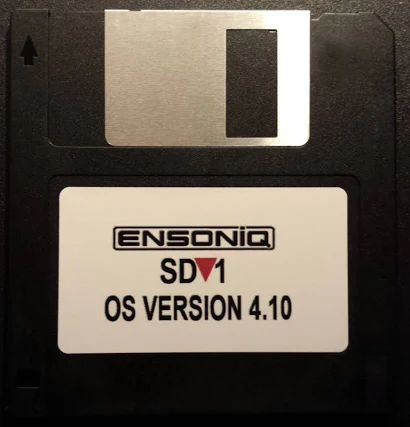
The Ensoniq SD-1 is a synthesizer from the 1990s — a ROMpler with a Motorola 68000 at its heart. Like many synthesizers of the era, it uses the cheap, easy, and simple storage medium of the day: 800K floppy disks for storage of everything: factory programs, user programs, presets (organized small sets of programs), full-up MIDI sequences, and its own operating system.
The format is proprietary and somewhat peculiar: a custom FAT, 10 sectors per track numbered 0 through 9 (not 1 through 10 like a PC), big-endian multi-byte fields throughout, and a handful of file types that the rest of the computing world has never heard of. To retrieve your data on a modern computer, or to get sounds back onto the synth, you need something that can speak this format.
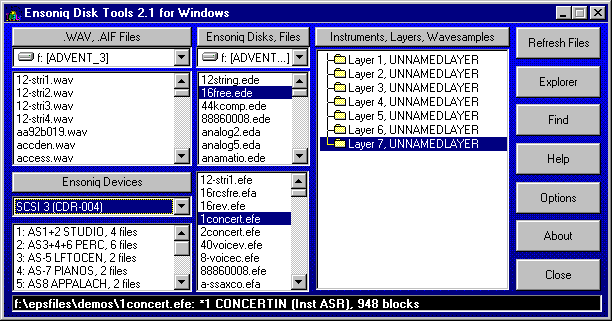
Few if any USB disk drives can handle this format; the extant programs which can read Ensoniq disks all run under MS-DOS (or Windows DOS emulation) and need a real, wired-in diskette drive to handle reading and writing disks. Forget about doing this on a Mac.
Fortunately, the SD-1 has a reasonably robust MIDI system-exclusive, or “SysEx”, implementation, capable of dumping and receiving pretty much everything except the actual sequencer OS that can record sequences to the SD-1’s internal memory and play them back. Those of us who saw the handwriting on the wall (and who didn’t want to keep a 486 tower lying around just to write the floppy disks that were becoming harder and harder to find anyway), took the earliest possible opportunity to dump everything out over SysEx and save it elsewhere.
Getting the sequencer OS back into the thing still needs a diskette, which is an issue (solved by third-party add-ons that could store hundreds of floppy images on a USB stick).
The renaissance
But there was some big news in March 2026, that made the question of accessing the SD-1’s disks and data an interesting topic again.
The folks at Sojus Records announced a wrapper around the previously-created SD-1 MAME emulator that allowed the SD-1 to be loaded as a VST3 plugin.
For all of us who had SD-1’s (or who still have them, but have shifted to much-more-convenient computer-based sequencing), this was a sit-up-and-take-notice moment. Our baby was now a plugin! And all that work we’d done previously was now usable again.
However! The first release of the plugin was only able to read .IMG files — a file format created by Gary Giebler to store floppy images on disks other than floppies. This meant that there needed to be a way to get .syx SysEx files back onto .IMG images so they could be used once more.
Sure, the Giebler and Rubber Chicken utilities were still out there, but I’m a Mac guy, and attempts to get those running properly on emulated MS-DOS were pretty much a failure. What I needed was a utility that could read and write disk images on my Mac.
A year ago I would have looked at that and said, “man, I do not have the time or the patience to read all those Transoniq Hacker articles and try to piece this together.” This year, I didn’t have to have that patience: I had Claude, and $20 worth of tokens a month to spend, so I thought, why not? This is actually a fairly well-defined problem:
Documentation for the disk organization and file formats exist in this PDF archive of the Transoniq Hacker
We have some disk images that we know work with the emulator, including a sequencer OS disk
The emulator seems to be able to read .IMG files fine, so if I can figure out how to write disks, I should be able to read them on the emulator.
This is a pretty solidly mapped-out basis to start from, and I figured that with both good documentation, sample data, and a working system to test against, I stood a pretty good chance of being able to carefully steer Claude to a solution.
Getting started
I decided that I wasn’t going to be fancy here. This is going to be called sd1diskutil because it’s just going to be a wrapper around a library that knows how to do the job.
So on March 26th, I sat down with Claude in the terminal, loaded obra/superpowers, and started brainstorming. I decided that, contrary to my more recent utility projects, I’d try to produce something that could be embedded into a prettier interface than just the command line.
That meant the first decision was to what language to implement this in, and after some discussion with Claude, we settled on Rust, to allow me to make this a functional programming approach, using very tight types and operations on them. This was, in hindsight, probably colored by my experiences with Scala and really tight types, and how that made it so much easier to write correct code.
To go with that and make it usable, we came up with a very thin CLI binary (sd1cli) that could convert MIDI SysEx dumps to and from the SD-1’s on-disk binary format provide full disk management — list, inspect, write, extract, delete, create.
Because I knew that eventually I wanted to wrap this up in a pretty UI, I asked Claude how to build Swift bridging in, and it included a clean UniFFI surface for SwiftUI, allowing the same library to eventually power a macOS application.
I knew that I was going to have to be very careful to implement this correctly. File systems and custom file formats are not forgiving, and the SD-1’s OS, though quite capable, is not what you would call robust.
The architecture therefore mirrored the data as closely as possible and tried to ensure that everything was as safe and stable as possible:
DiskImage owns the raw 819,200-byte image.
FileAllocationTable is a stateless handle that operates on a &mut DiskImage to avoid Rust borrow conflicts.
SubDirectory follows the same pattern.
SysExPacket is the only place nybble encoding and decoding happens — every layer above it works in plain bytes.
Atomic writes everywhere: save to a temp file, then rename.
I started out with a blank disk template created by the SD-1 emulator. What better source for a good disk than the emulator itself? (Oh, you sweet summer child. We’ll spend about three days beating our heads against this disk image.)
The first working implementation was achieved in a single burst: we planned out the types and operations, reviewed the design, and then built an implementation plan: workspace scaffold, error types, disk image, FAT, directory, SysEx parser, domain types, the full CLI. Integration tests for every command. The code compiled. The tests passed.
Then came the reality checks.
Block 4? Or block 5?
The Giebler articles said that the FAT should be at block 5. But our empty disk image from the emulator said it was at block 4. Everything else matched up: ten blocks long, 170 three-byte entries each. What was the problem? We could write files with our code to the blank image, and the SD-1 emulator could read them.
Figuring this took way longer than it should have, for a reason that only became clear in retrospect.
The blank disk template used during early development, as mentioned above, had been written by the Sojus VST3 plugin, which it turned out was concealing a sector-shifting bug that was actually happening at the underlying MAME emulator level!
See, normal DOS disks have 11 sectors per track, numbered 1 through 11. The SD-1 disks have ten, numbered zero to 9! MAME does handle the ten sectors per disk thing fine…but it uses SD-1 blocks 1 though 9, dropping block 0 and adding an empty all-zeroes block 10. So a fresh emulator-written disk has its FAT at block 4 instead of block 5. And a freshly-written emulator disk also immediately throws a DISK ERROR – BAD FORMAT if you try to read it…but we were only trying to write it, thereby breaking it, and then read it with our Rust code!
The Giebler article in Transoniq Hacker said block 5 and our write code was written to put it at block 5, which was correct. The disk from the emulator said block 4, because the emulator dropped block 0. The emulator could read the test disks written by our code fine — because sd1diskutil‘s own writes were correct.
But whenever the emulator saved a file back, it would quietly apply the shift again, moving the FAT back to block 4, exactly matching the initial (broken, but we didn’t know it) blank disk. So we went round and round, trying to resolve this: the article says 5, the disk says 4, the emulator reads 5 and writes 4, maybe both are correct and the article didn’t have that, so we should support either, or…?
I repeatedly tried to add files to the disks written by the emulator, and they always got DISK ERROR – INVALID FORMAT. How was I screwing this up?
I finally figured it out when I wrote a file to a good (block-5) disk and immediately tried to read it back (from the now block-4 disk). The emulator immediately threw a BAD DISK error…on its own output! So the emulator was wrong (though at the time we didn’t know why — see below!), and the article was right.
We created an empty disk by taking a copy of the known-good SEQUENCER-OS disk and deleting all the files from it using our code. We then wrote a single file to it and tried it on the emulator…and the disk was readable and the file was there.
Other early problems and fixes followed the same discipline of checking what we wrote against the emulator: local filenames needed to be forced to uppercase because the SD-1’s LCD doesn’t render lowercase. We had to analyze AllPrograms and AllPresets files on the SD-1 SEQUENCER-OS disk to figure out how to write them, and analyze how these were encoded into SysEx types (the SD-1 MIDI implementation helped some, but a lot had to be worked out from just trying things until we worked them out). The free block count management logic needed a rewrite. Each fix came from trying it and checking it against what the emulator would accept, not just blindly accepting the documentation, useful though it was,
The Program Interleave Bug
Of all the bugs, the program interleaving bug was the most insidious and hardest to fix, because it was wrong in a way that “worked”. Nothing broke, the OS didn’t complain, and on first glance seemed to be completely reasonable and perfectly correct…but sequences played back with all the wrong programs if they were being loaded from program memory. (ROM patches were fine.)
Programs stored in a SixtyPrograms file are byte-interleaved on disk: there are two independent 15,900-byte streams packed together, with the even byte positions carrying programs 0 through 29, and the odd byte positions carrying programs 30 through 59.
The original SysEx-to-program bank implementation had picked then outas alternating pairs — taking a program from the first half for bank 1, program 1, then a program from the second half for bank 1, program 2, and so on. The result was that programs were extracted perfectly, but landed at the wrong bank and patch position.
I was able to figure this out by loading a custom 60-sequence file with 60 embedded programs, playing it back, and seeing that the expected patches were there but in the wrong places. Unfortunately, the fact that the last time I’d actually looked at these sequences was 2010 or so meant that I didn’t remember where the right position was! I knew they were wrong because they sounded wrong, but not where the right place was.
It wasn’t until I found a SysEx dump of one of the factory sample sequences that we were able to write that to a .IMG and load it, then compare the locations where the programs went when our file was loaded in contrast to where they ended up when they were loaded from the SEQUENCER-OS disk by writing them down by bank and slot both ways and letting Claude figure out the mapping, which it did quite nicely.
Extracting the even and odd byte streams in both the file we wrote and the “good” on-disk one, and then searching for known program names within each stream, allowed Claude to find where the one patch I definitely knew the sequence used was in both sets of interleaved data and then derive the correct mapping: a first-half/second-half split rather than alternating pairs.
In the process of figuring all this out, we created a Python analysis tool, dump_programs.py, which could extract and list individual programs from multi-program SysEx dumps and disk files. Once we verified the extraction algorithm in the Python code, we were easily able to replicate it in Rust, and test it with two other sequence-and-program dumps by verifying they played back correctly on the emulator after being written to disk from a SysEx file.
Sequences and a Deeper Problem
Extracting sequences revealed a gap in the implementation: we could write SysEx files containing sequences and patches, but we couldn’t read them. There was a function that converted SysEx to the on-disk representation, but nothing that went the other direction.
We discovered this when we realized that extraction was wrapping raw disk bytes in a SingleSequence SysEx header and producing output twice the expected size. Proper test-first setup allowed us to easily implement this properly, writing a 60-sequence-and-program file to disk, verifying it sounded correct on the emulator, and then reading it back out to .syx, verifying that the new file was a byte-for-byte match against the original.
At this point, I wrote up the block-4/block-5 bug for the Sojus folks to take a look at on GitHub. (At this point I knew that there WAS a bug, but not WHY there was a bug.) They got back to me very quickly, and confirmed that yep, the emulator was screwing up the disk, and why.
The plugin routes all floppy writes through MAME’s get_track_data_mfm_pc, a function that expects PC-standard sector numbering (1–10). As mentioned, the Ensoniq format uses 0–9. MAME silently discards sector 0 of every Ensoniq track, shifts the remaining sectors down by one, and zeros the last slot! Once the emulator rewrites the track, every block on the track contains wrong data, and every tenth block is zeroed. This was the same bug that had broken the early blank disk template and sent us chasing the wobbly FAT location for days — now fully understood, and confirmed with the Sojus developers, who identified the affected code as esq16_dsk.cpp in MAME — the DOS-to-Ensoniq-and-back block mapping.
They’re busy working that as of 3/28, but in the meantime, they found a workaround: the emulation code can also read HFE format files. HFE stores the raw MFM flux data and bypasses MAME’s sector enumeration and extraction entirely. Which is totally awesome…but the sd1diskutil code did not speak HFE, and I’d never even heard of HFE. Watching the wonderful Usagi Electric suss out data encoding has educated me a little bit on data transitions and stuff like that, but it wasn’t something I was ready to work on myself at all!
Archaeology Before Engineering
Fortunately, the Sojus folks had an HFE image with some data on it to test with: two single patches (OMNIVERSE, SOPRANO-SAX) and a 60-program file. Claude and I embarked on trying to make sense of the data in this file, and this is where Claude seriously impressed me.
We started off with this HFE file. We knew basically that it should have MFM data in it, and nothing else. Claude bootstrapped up from knowing what MFM data should look like to actually finding it in the file and making sense of this otherwise opaque stream of bits!
Claude’s first attempt at locating sector headers found nothing. The standard MFM A1* sync marker should have been there ([0x44, 0x89]) but did not appear anywhere in the file. Claude figured out that this was because HFE stores bits LSB-first per byte, in the order the read head encounters them. The standard representation is MSB-first, so at first glance the data made no sense. Claude tried a bit-reversed version of the data, then a bit-reversed-per-byte version, and found the sync marker! [0x22, 0x91], with each byte bit-reversed.
Once that hurdle was crossed, it was simple for Claude to find the markers and decode all 1600 sectors. The FAT free count in the decoded image matched the hardware OS block count: 1510. The block-to-sector mapping was confirmed against blank_image.img:
block = track × 20 + side × 10 + sector
Track geometry was pinned down: each side of a track is exactly 12,522 encoded bytes. The fixed preamble (Gap4a, sync, Gap1) consumes 284 bytes. Each of the 10 sectors is 1,148 bytes with a fixed structure. The remaining 758 bytes are inter-sector gaps — 75 bytes for sectors 0 through 8, and the rest absorbed by sector 9.
I would have taken quite a long time and a lot of poring over the MFM spec and a lot of trial and error to figure this out, if ever, and Claude had it all doped out in half an hour or so.
At this point Claude knew how to read an HFE file but not what we should do with it.
We invoked the brainstorm/design spec/implemetation plan path again. I proposed that what we needed was a translation layer: just get the HFE image to an IMG image, and all of our tools could easily handle it. To use it on the emulator, we’d just convert the IMG image back to HFE, which the emulator should safely be able to read and write.
Superpowers wrote a complete design spec before any Rust code was touched, pulling in all the information Claude already had at hand about how the HFE files work, writing Python code to cross-check assumptions made in the spec: exact constants, the complete MFM encoding rules, CRC16-CCITT coverage, the interleaved side storage layout, error variants, test cases, the works.
Then superpowers wrote the implementation plan, with concrete function signatures, and specific expected outputs, all properly built as functions on types and easily testable.
HFE Implementation, going full vibe
At this point it was Claude’s party. I had read the spec and the plan, and everything looked reasonable, but I didn’t really know the HFE spec solidly enough to critique the code.
Claude created three new error variants: InvalidHfe, HfeCrcMismatch, HfeMissingSector, each carrying track, side, and sector context so errors are never ambiguous. Then hfe.rs itself: 771 lines creating the full encode/decode pipeline, and new CLI subcommands hfe-to-img and img-to-hfe to encode and decode HFE images.
The superpowers code review caught one bug: header offset 17 — the “do not use” field in the HFE v1 spec — was being written as 0x00. The spec requires 0xFF. A strict HFE reader would reject the file, and we knew the right answer, so…easy fix.
After implementation, the code passed all the low-level tests, and read_hfe on the sample HFE file properly decoded all 1600 sectors, returning a DiskImage whose directory listed OMNIVERSE, SOPRANO-SAX, and 60-PRG-FILE with the correct free block count. A complete round-trip from .img to HFE and back produced a byte-for-byte identical result.
The Acid Test
The final test of the HFE pipeline started with the Sequencer OS disk: an 800K image containing every file type the SD-1 supports: Thirteen OneProgram files. Eleven SixPrograms banks. A ThirtyPrograms bank, eight SixtyPrograms banks, four TwentyPresets banks, eight sequence files of various sizes, and the sequencer OS binary itself (656,384 bytes!), totaling forty-nine files, and leaving just five free blocks.
The disk was encoded to HFE and loaded into the emulator. Success! The emulator accepted the disk, an everything was present. I selected the sequencer OS, hit load, and it was loaded successfully. A previously-loaded sound bank in emulator memory contained a program named GREASE-PLUS, definitely not one already on the disk. I saved it to the HFE disk, and it wrote successfully.
We decoded the modified HFE file to an IMG and listed the contents: fifty files. Three free blocks. GREASE-PLUS in disk slot 13, a OneProgram file, two blocks. Complete success!
Future Plans
Now that this is done, I plan to release it on GitHub as a library. If I get around to writing the pretty GUI, I will probably see if I can sell that, because why not? The Giebler disk utilities still sell for $60!
At any rate, the CLI will be out there and should work, for anyone who wants to build it themselves.
Earlier in the year, I had LDR (low-dose) brachytherapy treatment for prostate cancer. The way it works is that the radiation oncologist, in concert with the urologist/surgeon, maps out where the cancer is in the prostate, and then builds up a map in 3D of exactly where to implant a set of radioactive seeds to irradiate the cancer and as little as possible of other things, like the bladder, urethra, and colon.
The treatment can use various radioactive isotopes; in my case, we decided on Palladium-103, which has a half-life of a tiny bit less than 17 days, and decays by electron capture, which I had not previously heard of.
One of the K-shell electrons in palladium-103 has has a chance of having nonzero probability density inside the nucleus. (Think of a big cartoon sign pointing to the nucleus that says “YOU MIGHT BE HERE” for the electron.)
If that happens, there’s a possibility that the weak nuclear force interaction between the electron and a proton in the nucleus will convert that proton into a neutron. That transforms the atom from palladium to rhodium and emits a neutrino.
No big deal to emit a neutrino; billions of them are constantly sleeting through us every second from the sun. But! Now the rhodium atom is missing an electron in the K-shell, so one of the existing electrons drops into that shell and now the atom has excess energy to dump. One of two things happens:
The “we’ve all seen this one in physics class”: the atom emits a photon (in this case a low-energy X-ray), and we’re back to normal energy. Ho hum.
Then there’s the “you can do that?” option: the electrons just play “hot potato” and pass around the extra energy until one is bound loosely enough to be kicked out — this is an Auger electron (named after Pierre Victor Auger, though Lise Meitner published it a year earlier — the guys get the credit again); from the radiomedical standpoint, it acts as if it were a beta particle — it’s a high-energy electron — but doesn’t come from a nuclear decay: the electron is literally handed the excess energy and sent packing with it.
For treating cancer, both of these are good news: the Auger electron is very short range but has high interactivity with the cancer cells to put them on the Oblivion Express (okay, that’s Brian Auger, not Pierre!); the X-ray photons travel further, but aren’t as strong. This means that the radioactivity is concentrated right where it’s needed.
But it’s not 100% absorbed.
One of the warnings I got was to make sure that I stayed around six feet away from young children and possibly-pregnant women for the first six weeks, as those are folks who can be affected much more by even the weak radioactivity I was shedding.
That made me wonder: just how radioactive was I, compared to when I started? Let’s make a chart!
Fortunately palladium-103’s decay is super simple: one path to rhodium-103, which is stable, so I can use the basic decay-curve equation to figure out exactly how much Pd-103 is left over time[1].
This only requires us to know the decay constant λ, which we do: 16.99 days. We can plug that into a little Python program and get a nice curve:
So the breakdown is actually pretty fast! We’re nearly at zero after 20 weeks, but because it’s an exponential curve, it’s a bit hard to read off numbers. Let’s look at that as a table:
So at 6 weeks, the “it’s okay to stop warning people” cutoff, I’m at about 18% of the original intensity. That doesn’t give me an absolute number, but is interesting.
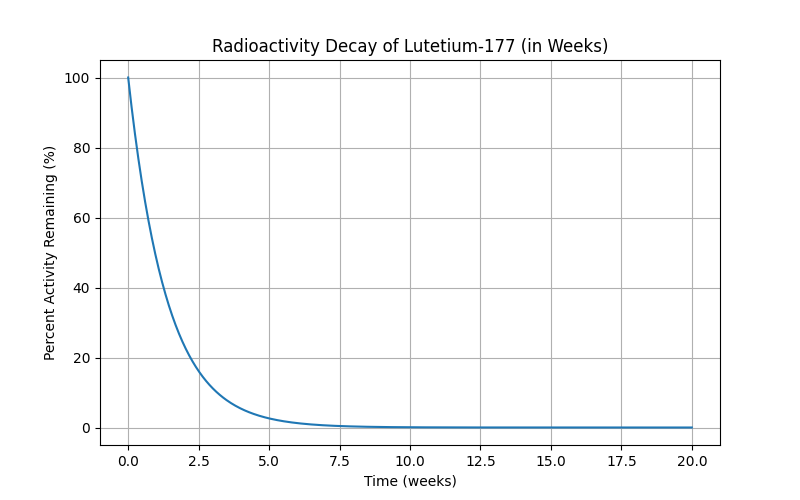
I posted this on Reddit in r/ProstateCancer, just because it interested me; the mods did remove it, and fair, it’s more a curiosity than anything useful. Before it got pulled, though, I had one person ask me about how fast Pluvicto decayed — that’s Lutetium-177, and again, very fortunately a one-step-to-stable path. λ for Lu-177 is much shorter, about 6.4 days, so the curve falls off much faster:
We’re pretty much at zero after ten weeks, which is significantly faster; the table looks like this:
The warnings are different for Lu-177: “limit close contact (less than 3 feet) with household contacts for 2 days or with children and pregnant women for 7 days. Refrain from sexual activity for 7 days, and sleep in a separate bedroom from household contacts for 3 days, from children for 7 days, or from pregnant women for 15 days.”
The remaining active Lu-177 is at about the same level, 20-ish percent in that amount of time, so my intuitive guess is that in terms of “radiation exposure to others”, the two are about the same.
Pd-103 hangs around longer, but because it’s just dropping those Auger electrons and the low-energy X-rays, they don’t propagate as much, and the effect is much more localized.
Lu-177 in Pluvicto circulates through the entire body, and binds to metastatic cancer cells there, so it makes sense that we’d want something that decayed a lot faster. (The Lu-177 decay is gamma and actual beta emission.)
Conclusions? None really, it was simply trying to understand what was happening better, and was probably displacement activity. 🙂
[1] In college, I wrote my very first computer program to simulate the decay of a single U-235 atom to a stable state. I had learned about if statements and the rand() function, but not arrays. So I had a sheaf of if‘s that figuratively “ticked the clock” by one half life for each if block, moving on to the next when the random coin flip said the atom had taken another step along the decay path. It had all the structure and sophistication of a noodle.
This was essentially a very bad and ridiculously unsophisticated Monte Carlo simulation, but in my defense, I had never written a computer program at all before, and I was extra proud I managed to make it work.
There were a lot of long printouts of decay timelines on fanfold paper.
A quick way to build, enhance, and repair your podcast episodes
Introduction
This all started when I was repairing a screwed-up Azuracast installation. I deinstalled and followed the “do this to remove the old volumes” instructions. That blew away all my stations and all my podcasts.
Yes. it was early in the morning.
Yes, I should have thought it through some more.
No, I shouldn’t have been trying to work then.
However. I was lucky in that I had filed my “completed” podcasts to be verified and then deleted, and I never got round to doing that, so I still had all my “lost” episodes. As ChatGPT hyperbolically put it, “[this was] the most heroic victory of procrastination I’ve ever seen.”
Okay, sure. Anyway.
I have fallen behind in keeping up with my podcasts. I haven’t put out podcasts for around three years or so of broadcasts. Some I had recordings of, some I only had playlists for, and some I just didn’t have at all…[I now have at least playlists for all but one! I’ll post an article on the rescue process soon.] but it seemed like I should try to catch up whatever I could, as people seem to really like to be able to listen to the show on their schedule instead of the broadcast one.
Surveying the podcasts, I found I had the following problems to solve:
Some episodes were just completely missing. There were hints as to what they might have been in the radiospiral.net show announcement posts, but I didn’t have the playlists. I might be able to put together something sort of like them, but I triaged this to the bottom of the list; doing this would require a lot of time and guesswork, and the best I’d get would be another Priority 3 episode. [I figured out that the RadioSpiral now-playing bot had records of almost every show in Discord! I’ve managed to recover all but one of the playlists – the bot was dead for only one show – so all of these are in a new Priority 4, rebuild playlists in iTunes.]
Some episodes I had iTunes playlists for, but not recorded episodes. I can redo the voiceovers for these, regenerate the whole podcast programmatically, and splice them in. Priority 3.
Some episodes I have in full but they haven’t been edited yet. Some needed replaced voiceovers, some just needed some cleanup. Still would require editing time, not automation. These just need to be edited and uploaded. Priority 2.
Finally, I have quite a few episodes that are done and dusted and ready to go back up. Priority 1.
Pretty good, I thought. I could get about 40 episodes back in circulation fast.
Problems to solve – priority 1 episodes
I looked at the priority 1 episodes and realized that there was a problem with them that I had not solved.
I use Fission to chapterize my podcasts, because it’s pretty fast and easy to use. I can easily zoom in and out of the waveform and find “split” points that translate into podcast chapter breaks. However, I’d had a problem with it — it’s possible to add per-chapter metadata, specifically a title and a graphic according to the ID3v2.3 spec, and Fission let me do that, but the saved files seemed to have lost the data. It had worked for a bit, and then it didn’t, and I had never solved why. That was “fix #1” needed, as both priority 1 and 2 episodes should have that working.
I resolved to skip it for the moment and get the episodes up, and figure out what was up with that later; not having the per-chapter graphics wasn’t a showstopper for those. So priority 1 episodes could go up right away, and I could come back to the lost graphics later.
I took a little time and wrote a script that can upload a set of episodes to both Azuracast (and to the Internet Archive, so I have a backup I have to take active steps to screw up). That’s the etheric-currents-uploader subdirectory in the Podcast Repair Kit.
It can upload to both places, with metadata and cover image included.
# Upload one episode
python3 uploader.py \
  --identifier 20210830-round-and-round \
  --title "Etheric Currents 20210830: Round And Round" \
  --description "Description of your episode" \
  --podcast episode.mp3 \
  --cover cover.jpg

# Upload multiple with a config file:
python uploader.py --config my_episodes.json
I won’t go into the episodes file config right now, but it made it easy to set-and-forget the upload of all 42 of my Priority 1 episodes and get back on the air.
Priority 2: edit and upload
I started on this process and was proceeding along with it when I hit the per-chapter metadata problem again…and solved it. I figured out how to rescue the “broken” episodes, fixing up the Priority 1’s that needed it, and readying that for the Priority 2’s that had been partially completed: chapterized, but without their final edits. See my post on figuring that out and fixing it here.
The tools coming out of that were
chapter-analyzer.py: does a text dump of the contents of the ID3v2.3 data. Critical to seeing what was wrong.
chapter-report.py: a nice HTML version of the previous report. Heavier on the pretty, lighter on the data.
rescue_busted_offsets.py: The kicker. Looks at the CHAP data from a file saved by Fission and fixes the broken pointers that prevent the per-chapter graphics (which it did save) from showing! This one rescues the Priority 1’s that were already uploaded so they can be replaced with properly-chapterized ones.
Priority 3’s: a faster, better path to recovery
Originally, I had a dumber script that assembled raw episodes from the M3U’s. It embedded a ten-minute silence for the intro, outro, and breaks during the show, allowing me enough space to record and paste in a replacement voiceover.
In the process of discovering how to fix the the broken chapters issue, it became clear that I might as well take advantage of the fact that I understood the problem and could solve it.
Instead of building in dummy silences, I realized I could save a tedious manual editing step by prerecording the breaks, naming them appropriately, and then having the script that read the M3U’s pick them up and insert them instead.
This streamlines the process of reconstituting the playlist-only shows considerably. All I have to do now is record the voiceovers I want, add them to iTunes, set the names to match the date of the episode I’m building, and run a single script.
build_episode_from_playlist_library.py: takes an M3U playlist (easy to export from iTunes) and reads the iTunes library to assemble a chapterized podcast file with working per-chapter metadata and graphics.
Priority 4 episodes
The priority 4 episodes are going to be more work, unless I can figure a way to build the M3U’s automatically. I’ve had a fair amount of success with Python scripting here so far, so another work session with Claude (the better programmer) may give me a script I can hand a list of tracks to, and get a ready-to-use M3U for Priority 3 back.
Toil to do
There’s going to be a certain amount of toil to take what I currently have and organize it into a work queue that I can just plow my way through; really no way to get around that, but once it’s done, it’s simply putting in the time to move items up the priority list and get them uploaded.
Conclusions
A whole lot of this was possible to do quickly by having ChatGPT available and asking it the right questions with data at hand to test with. The total amount of time spent to build all the rescue tools was less than a single day.
The problem space isn’t a complicated one, and I was greatly aided by the fact that really good libraries exist in Python to do the work, and that ffmpeg is really pretty awesome when it comes to manipulating and patching together audio files.
Do check out the repo on GitHub, and let me know what you think! (Patches/enhancements welcome!)
Recently, we’ve been working on trying to build some tooling to make our Azuracast experience for our DJs and listeners a little better.
Shooting myself in the foot: background
We’ve been trying to work around a longstanding bug: when a new streamer connects to Azuracast, Azuracast’s Liquidsoap processing picks up the last thing the previous streamer sent as now-playing metadata, and sets it as the metadata for the new streamer.
This makes a lot of sense if you’re coding for the situation where a streamer loses connectivity and then resumes; generally this will be short, so preserving the now-playing metadata makes the best sense.
However, we have a rotating set of DJs who each stream for a relatively short time – our standard show is 2 hours long. So this means that if DJ One signs off, and DJ Two starts streaming without sending new metadata after they’ve connected, then DJ Two’s set seems to be a continuation of DJ One’s signoff. This is confusing, and for streamers who prefer to simply connect and stream, means that their metadata will be “wrong” for a considerable part of the show.
Azuracast’s now-playing APIs say that we should be able to send the stream metadata any time with a call to the API:
The only problem is that on our installation running Azuracast 0.22.1, this returns a 200 and does absolutely nothing. Looking at the logs inside Azuracast, the request is being rejected because a streamer is active. I opened a bug for this, and the recommended solution was to upgrade to the current stable release, 0.23.1.
Round 1: Upgrading Azuracast
2025-10-19, 9 pm: I’d upgraded Azuracast before and it had been pretty much completely seamless: put up a notice, run the Azuracast updater, broadcasting stops a second, and then the new version resumes right where it left off.
Super easy, barely an inconvenience.
After our 7 pm show on Sunday, I noted we’d taken a nightly automated backup of our current 0.22.1 installation, and then went ahead and upgraded: broadcasting stopped a second, the UI reloaded. I had to log back in, and we were still playing the same track. Fantastic! All according to plan. I had not taken a full backup of my installation because we all know Azuracast always updates just fine.
This was critical error #1.
2025-10-20, 7:15 pm: The next evening, however, I tried to stream my show. All went well until about an hour and a half in, and suddenly the audio started to stutter and glitch. Badly. I took a look at the Liquidsoap logs on Azuracast and they were not pretty.
2025/10/21 19:18:55 [clock.local_1:2] Latency is too high: we must catchup 54.91 seconds! Check if your system can process your stream fast enough (CPU usage, disk access, etc) or if your stream should be self-sync (can happen when using `input.ffmpeg`). Refer to the latency control section of the documentation for more info.

...

2025/10/21 19:18:56 [clock.local_1:2] Latency is too high: we must catchup 54.97 seconds! Check if your system can process your stream fast enough (CPU usage, disk access, etc) or if your stream should be self-sync (can happen when using `input.ffmpeg`). Refer to the latency control section of the documentation for more info.

...

2025/10/21 19:18:57 [clock.local_1:2] Latency is too high: we must catchup 55.03 seconds! Check if your system can process your stream fast enough (CPU usage, disk access, etc) or if your stream should be self-sync (can happen when using `input.ffmpeg`). Refer to the latency control section of the documentation for more info.
2025/10/21 19:18:57 [input_streamer:2] Generator max buffered length exceeded (441000 < 441180)! Dropping content..
And so on. You can see that Liquidsoap is having a worse and worse time trying to consume my stream and send it on. I eventually stopped my show early; Liquidsoap did not recover as I expected it to, so I restarted Azuracast, and watched as the AutoDJ happily streamed away, and resolved to look at it the next day.
No reports of problems, so I assumed it was a fluke.
2025-10-21 7:30 pm: The next show that day, it happened again, and was just as bad. The Tuesday DJ also cut his show short.
We had a very, very broken Azuracast, and there was an all-day streaming concert planned for Saturday, four days away.
Round 2: rollback did not roll
2025-10-21, 8pm: I started working right after the cancelled show, reasoning that we were indeed very much under time pressure, and that multiple restarts/crashes/reinstalls during our stations primary listener hours would be a bad idea.
I decided to try a rollback to 0.22.1, where we’d been streaming just fine. Unfortunately, I was lacking a critical piece of information.
When you run Azuracast’s ./docker.sh install, you must “pin” the release level you want in azuracast.env if you don’t want the most recent version. This is not documented in big bold DO THIS OR YOU WILL BE COMPLETELY SCREWED letters in the Azuracast install docs, because of course you always want the most recent stable version, why wouldn’t you?
So I, and ChatGPT, my faithful (but unfortunately clueless about pinning versions, critical error #2: I had picked the wrong tool for the job because it gave me more answers for free) companion, embarked on getting the server fixed.
I went through multiple iterations of “I’ve reinstalled the server and it’s upgraded itself to 0.23.1 again”. I tried multiple ways to just install 0.22.1 and leave it there.
2025-10-21, 10:02 pm: I downloaded the code at the 0.22.1 tag and tried to run it in development mode and reinstall my automatic backup. It upgraded itself to 0.23.1.
2025-10-21, 10:40pm: I tried building all the Docker images myself at 0.22.1 and restoring the backup. It upgraded itself.
I tried downloading the Docker images, restoring, and just running them. It upgraded itself.
2025-10-21, 11:55pm: I managed to dig up a full backup of our 0.22.0 install, which was around a year old. This wasn’t ideal, but it was better than nothing at all, and restored it, then tried to install 0.22.1 from source. It chugged for a long time doing the restore…and upgraded itself to 0.23.1.
2025-10-21, 12:24 am: I then made critical error #3: I concluded that the 0.23.1 database on the database docker volume was the problem, and that I needed to deinstall Azuracast and retry the 0.22.1 install, following the documented deinstall/reinstall process. This was a bad idea, because it deleted the Docker volumes from my Azuracast install…and then erased them. So now I’d lost allmy station media, all my podcasts, and all my playlists. I was very hosed. [If I had not made critical error #1 (skipping the full backup), critical error #3 would not have been a problem.]
2025-10-21, 1:34 am: painstaking reload of the data from the old backup. It upgraded itself again.
2025-10-21, 3:22 am: tried again, more carefully. Restore. Wait. Watch it upgrade itself again.
2025-10-21, 4:41 am: Nothing I could think of, or that ChatGPT could think of, could fix it. We were down, hard.
2025-10-21, 5:21 am: The rest of the team is starting to come on line. Everything was broken, I was exhausted. They chase me off to bed, and I tried to sleep.
The rest of the team comes through
2025-10-22, 6 am: The rest of the team is up and online. ʞu¡0ɹʞS posts a neutral “we’re down for maintenance” banner on radiospiral.net. Southwind Niehaus suggests that she can provide an alternate Azuracast server for Saturday at 0.21.0, and the team pitches in to get that server set up to be a backup.
2025-10-22, 10 am: Mr. Spiral approves the switchover to Southwind’s server, and offers to send Gypsy Witch the tracks she needs to do her show. (She uses downloads from Azuracast to fill out her playlists.)
2025-10-22, 10:19 am: passing out the alternate server URL to Second Life denizens starts. It is decided to not change DNS to Southwind’s server because of propagation times.
2025-10-22, 10:27 am: plans to populate the substitute server proceed apace.
2025-10-22, 12:16 pm: Radiospiral.net web player repointed to substitute server, but metadata is not working. Phone alerts woke me up enough that I was able to supply the right now-playing metadata URL to ʞu¡0ɹʞS .
2025-10-22, 12:29 pm: Radiospiral.net is switched over. I update the iOS radio app’s config data on GitHub and confirm we have music but no metadata in the app; the metadata server URL was hardcoded in the released version of the app. I make a note to push out a new version with the metadata in the config file.
2025-10-22, 1:09 pm: I am able to find the version on the App Store and make the fix.
2025-10-22, 1:36 pm: Test version of the app up and available to beta testers.
2025-10-22, 2:08 pm: The substitute stream is working in all the correct places in Second Life as well. We close the PI.
I continued work on the iOS app; the real blocker was getting the screenshots right! Once that was done, I submitted the new version of the app on 10-25 and had an approval and the new version on the App Store by 10-26. Everything was working well with the substitute server, the Saturday show was successful, Southwind’s server handled the load perfectly, and kept going just fine, streaming shows and AutoDJing, while I resumed work on restoring 0.22.1.
Actually fixing it, day 1
I had used Claude to help verify the fixes I made to the iOS app, and it worked so much better than ChatGPT on code generation that I went ahead and subscribed at the $20/month level.
I brought up Claude on the Azuracast server, showed it the checked-out source code repo, and asked for help solving the problem of getting to and staying on 0.22.1.
Claude immediately told me about AZURACAST_VERSION, version pinning, and azuracast.env. [Looking back over the timeline, I wasted somewhere around 14.5 hours not knowing about that.]
We set the AZURACAST_VERSION=0.22.1 in azuracast.env.
Claude suggested a two-stage strategy to restore the nightly from just before the failed upgrade, and the old full backup.
First, I checked out Azuracast again at the 0.22.1 tag and let it install itself. Claude found and fixed a couple issues that were keeping it from building.
Once that was up and I had somewhere I could restore the files to, I first restored the old, full, backup. This got me back the media files, but not the playlists, stations, or podcasts. (It would turn out that the podcasts weren’t in that backup at all because we hadn’t started hosting them on Azuracast yet when it was taken.) That took about two hours.
We then restored the nightly over the old backup to get the station settings back. That took only a minute, and restored the current configs and database (including playlists). I had to reset my Azuracast login password (the azuracast:account:reset-password CLI command did that).
Because the database and the media library were not in sync, I had a lot of unassigned tracks in the library that I was going to need to get into proper playlists.
Claude helped me build SQL queries and a small PHP program to categorize the tracks by duration
< 2 minutes,which are often noisy and/or disruptive
2 minutes to 20 minutes (our standard AutoDJ tracks)
> 30 minutes, which get played on “long-play Sundays”
and sort them into the existing playlists where they were supposed to go. The few remaining < 2-minute tracks were listened to and filed appropriately. This in total took about an hour, and the server was back in good shape.
Day 2: Future-Proofing (~2 hours)
We discussed what we could do to stop testing in prod. Claude suggested a blue-green deployment strategy — one known-good server at all times, so we could flip from one to the other after doing testing.
We created /var/azuracast-staging to have somewhere to build the second server, and configured it to use ports 8000/8443 for its web interface, and the station ports on the 10xxx ports.
The media storage is shared between prod and staging; staging has read-only access. (This is sort of useful; it doesn’t allow us to move media around on the staging server, and I may switch it to just having its own volumes that I can swap to whichever instance is currently “production”.)
There’s now a DISASTER-RECOVERY.md document, a complete disaster recovery guide with all scenarios and an azuracast-upgrade-strategies.md that documents the blue-green deployment.
Lessons learned
If one is dealing with a PI with which one is not 100% a subject-matter expert, it is critical to have one available, whether a human or LLM one. I chose the wrong LLM one: as soon as I had Claude look at the configuration and told it I wanted to be running at 0.22.1 and stay there, it told me about pinning the version in azuracast.env.
Testing in production, which is what I ended up doing with the upgrade to 0.23.1, was a bad idea. I worked with Claude to come up with a setup allowing me to run a staging Azuracast server in parallel with the production one. This lets me try things on a server that’s okay to break. It’s probably an idea to have a dev one too, but I’ll come back to that later.
Carefully integrating full backups into the upgrade process at the correct points is critical to being able to roll back as quickly as possible. (This is carefully documented in the disaster recovery document. The recommended number of backups uses around half a terabyte of storage, but it carefully checkpoints everything along the way.)
It’s still possible to be down for an hour or more, but not for the multiple days that resolving this took this time.
True! — nervous — very, very dreadfully nervous I had been and am; but why will you say that I am mad?
Edgar Allen Poe, The Tell-Tale Heart
What’s a chapter?
I started doing my Etheric Currents radio show on RadioSpiral back in 2021, and like many of the other hosts, I recorded the episodes so people who couldn’t tune in Monday nights could listen to the show whenever they had time via a podcast.
Most podcasts just record the MP3, clean up the worst of the um’s and er’s and verbal tics (I say “all right!” waaay too much), and then publish their show as a simple MP3.
But! MP3’s support chapters, and chapters are pretty cool. They allow your podcast to look a lot like an audiobook in podcatchers: the episode has a list of chapters, and the listener can skip around or repeat them, and the podcatchers put up the chapter info in their display.
Rogue Amoeba’s Fission editor does a great job of creating chapters: add a “split” at the appropriate point on the timeline, and you can add the chapter metadata right there. Great UX.
And, as shown above, podcatchers like Overcast and Apple Podcasts will show the chapters in their displays.
Why is it important now?
If you’re a podcaster signed up at podcastsconnect.apple.com, you probably recently got an email from Apple letting you know that they were “enhancing chapter support” in Apple-hosted podcasts. Specifically:
If your podcast already has chapters, nothing changes
If it doesn’t,then Apple’s going to use AI to “listen” to your podcast episodes and insert chapters for you.
I’m guessing that for 90% of podcasts, that this will work pretty well, but if you are a bit obsessive about getting stuff “just so,” you will probably be happier doing this yourself.
There are lots of other options for chapterizing your episodes; several online tools will take a list of times (mm:ss) and names, and plop all the chapters in where you want them. Fission (aforementioned) will let you do it in a nice graphical interface.
The MP3 specification version for ID3v2.3 allows for quite a bit of information in the chapters, including per-chapter graphics. My show plays a lot of tracks from our music library, and I wanted to add the covers and track names as chapters, so a listener could see a track list and the cover for the album the track came from. (Our remit is promoting the music we play; this is another great way to remind people that the music comes from real albums by real artists, and they should pick it up to support them.)
So I started doing that with Fission, and for the first year or so, it worked perfectly. I copied the artwork from iTunes, pasted it in, updated the metadata, and it just worked.
I could have sworn I did this right…
So I didn’t notice when at some point, it stopped working. The chapters were still getting created, no problem, but the extra metadata? Disappeared as soon as I saved. I had a conversation with Rogue Amoeba around that time in 2022 and it came out that yes, we should be able to do that, but the current application could not [my note: “anymore”] and it’d go on a “future enhancements” list.
Sigh. Well.
I mean, I get it, this is kind of niche for someone who just wants chapters; not a lot of people care about per-chapter graphics, and that’s okay. Rogue Amoeba doesn’t exactly have an infinite number of developers, and there are a lot of other things they do that I really do not want to go stale, so no shade on Rogue Amoeba at all.
I let this go for a while. Life happened, and my unposted podcast backlog started getting…long. After a bit of a kerfuffle on the RadioSpiral Azuracast server a few weeks ago that resulted in the Docker volume that the podcasts live on getting clobbered (for anyone else running Azuracast: full backups!). I decided that I really needed to start playing catchup here: restore those, and rebuild/restore the three years of backlog. (I’ll document the process of digging myself out of that hole in another post and link it here when it’s done.)
One of the big problems was “I want my nice chapters back.” And that’s what the rest of this post is about.
First: prove to myself that I am not mad
I remembered having episodes where everything worked, and I dug around in the archived episodes I had put back up, and found one. Loaded it in Fission, and skipped through the chapters. Every chapter had the title of the track and the album art. It did work.
I tried again in Fission. I’d been using it to chapterize the Miskatonic University Podcast episodes that I’ve been editing, and that was working fine. Chapterized a current podcast of mine: chapters were there, titled fine…but no art.
If I added it, Fission took it, and threw it away on save.
“I felt that I breathed an atmosphere of sorrow”.
Edgar Allen Poe
In desperation, I asked ChatGPT: “Chapterized MP3’s: is it actually possible to have a custom graphic for each chapter?”.
Initially, it seemed like bad news: most podcatchers don’t support the enhanced chapter stuff in the IDv32.4 spec so I was out of luck. My reply was, lookit, I have an episode right here that works in my podcatcher. Can we analyze it and see what structure it has? Whatever it does is good enough to work.
So between the two of us, we put together a Python script using mutagen to read the good episode and dump out all the IDv3 data to see why this one was good and the others were not.
A few minor issues with hallucinations about how mutagen works and we had a working script that dumped it all. I thought about it a bit, and had the idea: let’s compare the output from a good file to the bad one I’d just created, and see what’s different.
The problem was right there, and easy to fix. The metadata was IDv32.3, and that the podcatchers do understand…but a little more explanation of how chapters work and what’s in them is probably useful before I start blithering about the fix and offsets and hex values.
The basics of IDv3 data
IDv3 data is sandwiched into the MP3 file, with offsets as pointers to each successive part and to subparts of individual bits of that data. Here’s the overview of how it’s all hooked up:
So it’s a pretty simple linked list, with the subframes either containing or point to other IDv3 data. When a podcatcher gets to the CHAP data, it picks it up and displays it. Simple.
The “good” file’s data looks like this:
CHAP #1:
  element_id: 'ch0'
  start_time: 0 ms
  end_time: 280764 ms
  start_offset: 0
  end_offset: 0

  TIT2 (chapter titles): - ['Typhoon/Dymaxion Variations/Mercury Intro']

  APIC (per-chapter images):
    APIC #1:
      mime: image/jpeg
      type: PictureType.OTHER
      desc: ''
      data length: 3053522 bytes

CHAP #2:
  element_id: 'ch1'
  start_time: 280764 ms
  end_time: 598804 ms
  start_offset: 0
  end_offset: 0

  TIT2 (chapter titles): - ['Mountain Dreams']

  APIC (per-chapter images):
    APIC #1:
      mime: image/jpeg
      type: PictureType.OTHER
      desc: ''
      data length: 192594 bytes
Now compare the “bad” file:
CHAP #1:
  element_id: 'ch0'
  start_time: 0 ms
  end_time: 163996 ms

  start_offset: 4294967295
  end_offset: 4294967295

  TIT2 (chapter titles): - ['Etheric Currents Intro: Green']

  APIC (per-chapter images):
    APIC #1:
      mime: image/jpeg
      type: PictureType.OTHER
      desc: ''
      data length: 2329950 bytes

CHAP #2:
  element_id: 'ch1'
  start_time: 163996 ms
  end_time: 483996 ms

  start_offset: 4294967295
  end_offset: 4294967295

  TIT2 (chapter titles): - ['Dripping Green']
  APIC (per-chapter images):
    APIC #1:
      mime: image/jpeg
      type: PictureType.OTHER
      desc: ''
      data length: 46665 bytes
Hm. That’s different. And that number looks familiar…
4294967295 -> 0xFFFFFFFF
Ha! That is, according to the IDv3 spec, a NIL pointer.
So Fission is writing the image data in, even in the “bad” file: we can see the data length is non-zero. But it’s also writing a nil “these aren’t the images you want, move along” pointer into the file, so anything reading the file says, “nope, no chapter image here, just use the base one for the file”! And that includes Fission itself when it reloads the file!
Now that I know what’s wrong…can I fix it?
Spoiler: YES. And it’s trivial! All I have to do is scan through the CHAP blocks, and set the start_offset and end_offset to 0.
Take a look at rescue-busted-offsets.py in my Podcast Repair Kit repo on GitHub. Better yet: here’s output from the chapter-report.py tool (another handy little item, for visualizing your podcast episodes!)in that same repo, showing a podcast file from before and after a repair:
I’ll have more to say about the catch-up process in general in another post.