Category: Programming

  • Fixing the Twenty Seventeen Theme Zoom Problem on the iPad

    The Twenty Seventeen WordPress theme is a beaut. You can set up your home page to scroll any number of fixed pages, each with its own header image, each appearing as you scroll down the page. For an art site, like shymaladasonart.com, this is gorgeous and lets you show off sample images.

    Problem is, on the Pad the images look horrendous because the CSS makes them weirdly zoom in at a huge magnification, and the previously-lovely effect becomes a mess.

    After a lot of poking about, this bug’s apparently been an issue for quite a while, and obviously still isn’t fixed. Fortunately, there is a workaround. You need to log in to wp-admin, select Appearance > Customize > Additional CSS, and add this:

    @media screen and (min-device-width:768px) and (max-device-width: 1024px) {
        .background-fixed .panel-image { 
            background-attachment: unset;
            width: 100%;
        }
    }

    This will check specifically for the iPad, and turn off the pretty effect that scrolls the page content over the header image. It’s not quite as cool on the iPad, but at least now it doesn’t look bad.

  • obliquebot returns

    Some time back, when beepboop.com was still around, I wrote a little Slack bot that listened for “oblique” or “strategy” in the channels it had been invited to, and popped out one of Eno’s Oblique Strategies when it heard its keywords or was addressed directly.

    It worked fine up until the day that BeepBoop announced that they were going away, and eventually obliquebot stopped working.

    This month, I decided that I would stop ignoring the “you have a security issue in your code” notifications from GitHub, and try catching obliquebot up with the new version of the SLAPP library that I’d used to get Spud, the RadioSpiral.net “who’s on and what’s playing” robot back online.

    I went through all the package upgrades and then copied the code from Spud over to the obliquebot checkout. The code was substantially the same; both are bots that listen to channels and respond, without doing any complex interaction. I needed to add the code to load the strategies from a YAML file and to select and print one, but the code was mostly the same.

    I also needed to update the authentication page to show the obliquebot icon instead of the RadioSpiral one, and to set the OAuth callback link to the one supplied by Slack.

    Once I had all that in place, I spent a good two or three hours trying to figure out why I could build the code on Heroku, but not get it to run. I finally figured out that I had physically turned off the dyno, and that it wasn’t going to do anything until I tuned it back on again.

    obliquebot is now running again at RadioSpiral and the Disquiet Junto Slack, and I’ve updated the README at the code’s GitHub page to outline all the steps one needs to take it and build one’s own simple request-response bot.

  • The Harp of New Albion’s Tuning for Logic

    The Disquiet Junto is doing an alternate tunings prompt for week 0440 (very apropos!).

    I’ve done several pieces before using Balinese slendro and pelog tuning, most notably Pemungkah, for which this site is named. I wanted to do something different this time, using Terry Riley’s tuning from The Harp of New Albion, using Logic Pro’s project tuning option.

    The original version was a retuning of a Bosedorfer grand to a modified 5-limit tuning:

    However, Logic’s tuning feature needs two things to use a tuning with it:

    • Logic’s  tuning needs to be based on C, not C#
    • The tuning has to be expressed as cents of detuning from the equal-tempered equivalent note.

    This leads one to have to do quite a number of calculations to put this in a format that Logic will like.

    (more…)

  • Life in the fast lane / Surely makes you lose your mind

    I came back to the Radiospiral iOS app after some time away (we’re trying to dope out what’s going on with metadata from various broadcast setups appearing in the wrong positions on the “now playing” screen, and we need a new beta with the test streams enabled to try things), only to discover that Fastlane had gotten broken in a very unintuituve manner. Whenever I tried to use it, it took a crack at building things, then told me I needed to update the snapshotting Swift file.

    Okay, so I do that, and the error persists. Tried a half-dozen suggestions from Stack Overflow. Error persists. I realized I was going to need to do some major surgery and eliminate all the variables if I was going to be able to make this work.

    What finally fixed it was cleaning up multiple Ruby installs and getting down to just one known location, and then using Bundler to manage the Fastlane dependencies. The actual steps were:

    1. removing rvm
    2. removing rbenv
    3. brew install ruby to get one known Ruby install
    4. making the Homebrew Ruby my default ( export PATH=/usr/local/Cellar/ruby/2.7.0/bin:$PATH)
    5. rm -rf fastlane to clear out any assumptions
    6. rm Gemfile* to clean up any assumptions by the current, broken Fastlane
    7. bundle install fastlane (not gem install!) to get a clean one and limit the install to just my project
    8. bundle exec fastlane init to get things set up again

    After all that, fastlane was back to working, albeit only via bundle exec, which in hindsight is actually smarter.

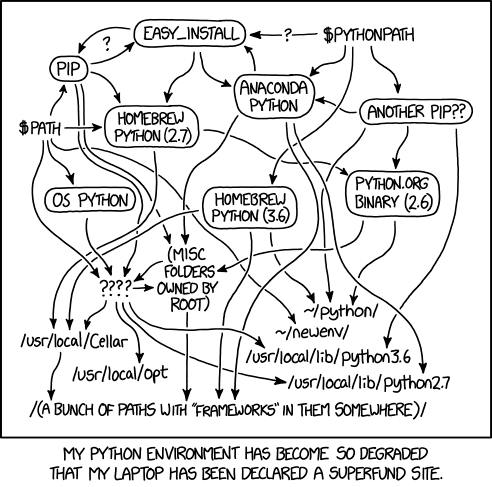
    The actual amount of time spent trying to fix it before giving up and removing every Ruby in existence was ~2 hours, so take my advice and make sure you are absolutely sure which Ruby you are running, and don’t install fastlane into your Ruby install; use bundler. Trying to fix it with things going who knows where…well, there’s always an applicable xkcd.

    You are in a maze of Python installations, all different

  • Broken iframes and HTML::TreeBuilder

    We had a situation last week where someone had entered a broken <iframe> tag in a job description and our cleanup code didn’t properly remove it. This caused the text after the <iframe> to render as escaped HTML.

    We needed to prefilter the HTML and just remove the <iframe>s. The most difficult part of this was figuring out what HTML::TreeBuilder was emitting and what I needed to do with it to do the cleanup. It was obvious that this would have to be recursive, since HTML is recursive (there could be nested, or multiple uncosed iframes!) and several tries at it failed until I finally dumped out the data structure in the debugger and spotted that HTML::TreeBuilder was adding “implicit” nodes. These essentially help it do bookkeeping, but don’t contain anything that has to be re-examined to properly do the cleanup. Worse, the first node contains all th text for the current level, so recursing on them was leading me off into infinite depths, as I kept looking for iframes in the content of the leftmost node, finding them, and uselessly recursing again on the same HTML.

    The other interesting twist is that once I dropped the implicit nodes with a grep, I still needed to handle the HTML in the non-implicit nodes two different ways: if it had one or more iframe tags, then I needed to use the content method to take the node apart and process the pieces. There might be one or more non-iframes there, which end up getting returned untouched via as_HTML. If there are iframes, the recursion un-nests them and lets us clean up individual subtrees.

    Lastly, any text returned from content comes back as an array of strings, so I needed to check for that case and recurse on all the items in the array to be sure I’ve filtered everything properly. My initial case checks for the trivial “no input so no output”, and “not a reference” to handle the starting string.

    We do end up doing multiple invocations of HTML::TreeBuilder on the text as we recurse, but we don’t recurse at all unless there’s an iframe, and it’s unusual to have more than one.

    Here’s the code:

    +sub _filter_iframe_content {
      my($input) = @_;
      return '' unless $input;
    
      my $root;
      # We've received a string. Build the tree.
      if (!ref $input) {
        # Build a tree to process recursively.
        $root = HTML::TreeBuilder->new_from_content($input);
        # There are no iframe tags, so we're done with this segment of the HTML.
        return $input unless $root->look_down(_tag=>'iframe');
      } elsif (ref $input eq 'ARRAY') {
        # We got multiple strings from a content call; handle each one in order, and
        # return them, concatenated, to finish them up.
        return join '', map { _filter_iframe_content($_) } @$input;
      } else {
        # The input was a node, so make that the root of the (sub)tree we're processing.
        $root = $input;
      }
    
      # The 'implicit' nodes contain the wrapping HTML created by
      # TreeBuilder. Discard that.
      my @descendants = grep { ! $_->implicit } $root->descendants;
    
      # If there is not an iframe below the content of the node, return
      # it as HTML. Else recurse on the content to filter it.
      my @results;
      for my $node (@descendants) {
        # Is there an iframe in here?
        my $tree = HTML::TreeBuilder->new_from_content($node->as_HTML);
        if ($tree->look_down(_tag=>'iframe')) {
          # Yes. Recurse on the node, taking it apart.
          push @results, _filter_iframe_content($node->content);
        } else {
          # No, just return the whole thing as HTML, and we're done with this subtree.
          push @results, $node->as_HTML;
        }
      }
      return join '', @results;
    }
    
  • It’s WordPress Scramble Week!

    The first sign of trouble is Google telling me that I’ve got multiple URLs going to the same page. That’s weird. How could that be happening?

    So I go to my site. And I get a 500 error. All the links get 500 errors.

    Uh oh.

    Okay, okay, I know what causes this: radiospiral.net broke this way last week – Jetpack will happily update itself to a revision that isn’t supported by PHP 5.6 without checking (it needs PHP 7 at least once it upgrades itself).

    So I go to my Hostgator CPanel to upgrade PHP.  Cool – I can upgrade it on all my sites with one click! I make PHP 7 the default, and check my site. Yep, all’s okay now. Job well done!

    Hang on a second – shymaladasonphotography.com uses a custom plugin too and is hosted under this account, better check – and it’s rendering a PHP error.

    AWESOME.

    Switch PHP back to 5.6, log in to the photo site. Yeah, that was it. All right, I’ll upgrade the plugin, and no, I won’t, because they’ve dropped support for the version I purchased! All I need to do is upgrade to the Plus version…and at this point I decide that I need to do this myself.

    So I go find a new theme, and install it. Now I need to reconstruct all the custom galleries. Go figure out where WordPress put the photos that were uploaded, since they’re not showing up in the media library as they should. Since they’re not there, I’ll have to get them there to be able to use them in standard widgets.

    I turn on SSH for my site, download all the photos, edit the gallery pages, delete the old gallery widget, add a new image carousel widget, upload the photos again, rebuild the carousels, and set PHP back to 7.0 to unbreak my other sites again.

    Photo site works, my site works, I think I’m done, and this has eaten an afternoon.

    Considering strongly just coding everything by hand in HTML at this point.

  • App Store Connect usability issues

    Allow me to be the Nth person to complain about App Store Connect’s lack of transparency, I’m currently working on an app for radiospiral.net’s net radio station, and I’m doing my proper dilligence by getting it beta tested by internal testers before pushing it to the App Store. I’m using TestFlight to keep it as simple as possible (and because fastlane seems to work well with that setup).

    I managed to get two testers in play, but I was trying to add a third today and I could not get the third person to show up as an internal tester because I kept missing a step. Here’s how it went, with my mental model in brackets:

    • Go to the users and groups page and add the new user. [okay, the new user’s available now].
    • Add them to the same groups as the other tester who I got working. [right, all set up the same…]
    • Added the app explicitly to the tester. […and they’ve got the app]
    • Mail went out to the new tester. [cool, the site thinks they should be a tester] [WRONG]
    • Tester installs Testflight and taps the link on their device. Nothing appreciable happens. [Did I set them up wrong?]
    • Delete the user, add them again. [I’ll set them up again and double-check…yes, they match]
    • They tap again. Still nothing. [what? but…]
    • Go over to the Testflight tab and look at the list of testers. Still not there. [I added them. why are they not there?] [also wrong]

    Much Googling and poking about got me nothing at all. Why is the user I added as an internal tester not there? They should be in the list.

    I went back to the page and this time I saw the little blue plus in a circle. I have to add them here too! Clicked the +, and the new user was there, waiting to be added to the internal testers.

    Sigh.

    So now I have blogged this so I can remember the process, and hopefully someone else who’s flailing around trying to figure out why internal testers aren’t showing up on the testers list will find this.

  • Scraping Patchstorage

    I lost an important VCVRack patch a couple days before Mountain Skies 2019. It was based on a patch I’d gotten from patchstorage.com, but I couldn’t remember which patch it was. I tried paging through the patches on the infinite scroll, but it wasn’t helping me much. I knew the patch had Clocked and the Impromptu 16-step sequencer, but I couldn’t remember anything else about it after seriously altering it for my needs.

    I decided the only option was going to have to be automated if I was going to find the base patch again in time to recreate my performance patch. I hammered out the following short Perl script to download the patches:

    use strict;
    use warnings;
    use WWW::Mechanize;
    use WWW::Mechanize::TreeBuilder;
    
    $|++;
    
    my $base_url = "https://patchstorage.com/platform/vcv-rack/page/";
    my $mech = WWW::Mechanize->new(autocheck=>0);
    WWW::Mechanize::TreeBuilder->meta->apply($mech);
    use constant SLEEP_TIME => 2;
    
    my $seq = 1;
    my $working = 1;
    while ($working) {
      print "page $seq\n";
      $mech->get($base_url.$seq);
      sleep(SLEEP_TIME);
      my @patch_pages = $mech->look_down('_tag', 'a');
      my @patch_links = grep {
        defined $_ and
        !m[/upload\-a\-patch\/] and
        !m[/login/] and
        !m[/new\-tutorial/] and
        !m[/explore/] and
        !m[/registration/] and
        !m[/new\-question/] and
        !m[/explore/] and
        !m[/platform/] and
        !m[/tag/] and
        !m[/author/] and
        !m[/wp\-content/] and
        !m[/category/] and
        !/\#$/ and
        !/\#respond/ and
        !/\#comments/ and
        !/mailto:/ and
        !/\/privacy\-policy/ and
        !/discord/ and
        !/https:\/\/vcvrack/ and
        !/javascript:/ and
        !/action=lostpassword/ and
        !/patchstorage.com\/$/ and
        ! $_ eq ''} map {$_->attr('href')} @patch_pages;
        my %links;
        @links{@patch_links} = ();
        @patch_links = keys %links;
        print scalar @patch_links, " links found\n";
        for my $link (@patch_links) {
          next unless $link;
          print $link;
          my @parts = split /\//, $link;
          my $patch_name = $parts[-1];
          if (-f "/Users/jmcmahon/Downloads/$patch_name") {
            print "...skipped\n";
            next;
          }
          print "\n";
          $mech->get($link);
          sleep(SLEEP_TIME);
          my @patches = $mech->look_down('id', "DownloadPatch");
          for my $patch (@patches) {
            my $p_link = $patch->attr('href');
            next unless $p_link;
            print "$patch_name...";
            $mech->get($patch->attr('href'));
            sleep(SLEEP_TIME);
            open my $fh, ">", "/Users/jmcmahon/Downloads/$patch_name" or die "Can't open $patch_name: $!";
            print $fh $mech->content;
            close $fh;
            print "saved\n";
          }
        }
        $seq++;
     }
    

    Notable items here:

    • The infinite scroll is actually a chunk of Javascript wrapped around a standard WordPress page setup, so I can “page” back through the patches for Rack by incrementing the page number and pulling off the links to the actual posts with the patches in them.
    • That giant grep and map cleans up the links I get off the individual pages to just the ones that are actually links to patches.
    • I have a couple checks in there for “have I already downloaded this?” to allow me to restart the script if it dies partway through the process.
    • The script kills itself off once it gets a page with no links on it. I haven’t actually gotten that far yet, but I think it should work.

    Patchstorage folks: I apologize for scraping the site, but this is for my own use only; I”m not republishing. If I weren’t desperate to retrieve the patch for Friday I would have just left it alone.

  • A HOWTO for Test::Mock::LWP

    I was clearing out my CPAN RT queue today, and found a question in the tickets for Test::Mock::LWP from dcantrell:

    It’s not at all clear how to use this module. I have a module which (partly) wraps around LWP::UserAgent which I use to fetch data which my module then manipulates. Obviously I need to test that my module handles webby errors correctly, for instance that it correctly detects when the remote sites don’t respond; and I need to be able to feed known data to my module so I can test that it does those manipulations correctly.

    Test::Mock::LWP is the obvious candidate for faking up LWP::UserAgent, but I just can’t figure out how to use it. Please can you write a HOWTO and add it to the docs.

    I’m adding the HOWTO tonight, even though the question was asked 12 years ago (I really need to get to my RT queue more often). The module’s description as it stands is pretty opaque; this explanation should, I hope, make it much more clear.

    HOWTO use Test::Mock::LWP

    Test::Mock::LWP is designed to provide you a quick way to mock out LWP calls.

    Exported variables

    Test::Mock::LWP‘s interface is exposed via the variables it exports:

    • $Mock_ua – mocks LWP::USerAgent
    • $Mock_req / $Mock_request – mocks HTTP::Request
    • $Mock_resp / $Mock_response – mocks HTTP::Response
    • All of these are actually Test::MockObject objects, so you call mock() on them to change how they operate dynamically. Here’s an example.

      Let’s say you wanted the next response to an LWP call to return the content foo and an HTTP status code of 201. You’d do this:

       
      BEGIN {
        # Load the mock modules *first*.
        use Test::Mock::LWP::UserAgent;
        use Test::Mock::HTTP::Response;
        use Test::Mock::HTTP::Request;
      }
      
      # Load the modules you'll use to actually do LWP operations.
      # These will automatically be mocked for you.
      use LWP::UserAgent;
      use HTTP::Response;
      use HTTP::Request;
      
      # Now set up the response you want to get back.
      $Mock_resp->mock( content => sub { 'foo' });
      $Mock_resp->mock( code    => sub { 201 });
      
      # Pretend we're making a request to a site.
      for (1..2) {
        my $req   = HTTP::Request->new(GET => 'http://nevergoeshere.com');
        my $agent = LWP::UserAgent->new;
        my $res   = $agent->simple_request($req);
      }
      # The values you added to the mock are now there.
      printf("The site returned %d %s\n", $res->code, $res->content);
      

      This will print

      201 foo
      201 foo
      

      Getting more than one value out of the mocks: repeated re-mocks

      Note that the values are constrained to what you’ve sent to the mocks. The mock here will simply keep returning 201 and foo for as many times as you call it. You’ll need to re-mock the content and code methods
      each time you want to change them.

      my $req   = HTTP::Request->new(GET => 'http://nevergoeshere.com');
      my $agent = LWP::UserAgent->new;
      
      $Mock_resp->mock( content => sub { 'foo' });
      $Mock_resp->mock( code    => sub { 201 });
      my $res   = $agent->simple_request($req);
      
      printf("The site returned %d %s\n", $res->code, $res->content);
      # 201 foo
      		
      $Mock_resp->mock( content => sub { 'bar' });
      $Mock_resp->mock( code    => sub { 400 });
      my $res   = $agent->simple_request($req);
      
      printf("The site returned %d %s\n", $res->code, $res->content);
      # 400 bar	
      

      Moving the logic into the mocks

      If you have a fixed sequence of items to return, just add them all to the mocks and have the mocks step through them. Here’s an example where we hand off two lists of values to the mocks:

      use strict;
      BEGIN {
        # Load the mock modules *first*.
        use Test::Mock::LWP::UserAgent;
        use Test::Mock::HTTP::Response;
        use Test::Mock::HTTP::Request;
      }
      
      # Load the modules you'll use to actually do LWP operations.
      # These will automatically be mocked for you.
      use LWP::UserAgent;
      use HTTP::Response;
      use HTTP::Request;
      
      my @contents = qw(foo bar baz);
      my @codes    = qw(404 400 200);
      
      # initialize counter.
      my $code_counter = 2;
      my $content_counter = 2;
      
      my $content_sub = sub {
        $content_counter += 1;
        $content_counter %= 3;
        $contents[$content_counter];
      };
      
      my $code_sub = sub {
        $code_counter += 1;
        $code_counter %= 3;
        return $codes[$code_counter];
      };
          
      $Mock_resp->mock(content => $content_sub);
      $Mock_resp->mock(code    => $code_sub);
          
      my $req   = HTTP::Request->new(GET => 'http://nevergoeshere.com');
      my $agent = LWP::UserAgent->new;
          
      for (0..5) {
        my $res   = $agent->simple_request($req);
        printf("The site returned %d %s\n", $res->code, $res->content);
      }
      

      This will print

          The site returned 404 foo
          The site returned 400 bar
          The site returned 200 baz
          The site returned 404 foo
          The site returned 400 bar
          The site returned 200 baz
      

      Remember: the key is make sure that the mock is ready to return the next item when you make the next request to the user agent.

  • Recovering my old Scape files

    My original iPad finally bit the dust in August, just before I could get a final good backup of it. Most of the stuff on it was already backed up elsewhere (GMail, Dropbox, iCloud), but Scape was the exception.

    Scape is (at least not yet) able to back up its files to the cloud, so there wasn’t anyplace else to restore from — except I had take advantage of the fact that under iOS5, the files in the app were still directly readable using Macroplant’s iExplorer, so I had actually grabbed all the raw Scape files and even the Scape internal resources. Sometime I’ll write up what I’ve figured out about Scape from those files…

    The Scape files themselves are just text files that tell Scape what to put on the screen and play, so the files themselves were no problem; they don’t include checksums or anything that would make them hard to work with.


    Version:0.20
    Mood:7
    Date:20121113025954
    Separation:0.50
    HarmonicComplexity:0.50
    Mystery:0.50
    Title:Scape 117
    Steam Factory,0.50,0.50,1.0000
    Spirit Sine Dry,0.23,0.31,3.1529
    Spirit Sine Dry,0.40,0.36,3.4062
    Spirit Sine Dry,0.64,0.19,3.9375
    Spirit Sine Dry,0.55,0.49,1.0065
    Spirit Sine Dry,0.26,0.67,3.5039
    Spirit Sine Dry,0.76,0.54,3.1211
    Spirit Sine Dry,0.49,0.79,3.8789
    Spirit Sine Dry,0.46,0.17,3.9766
    Spirit Sine Dry,0.85,0.27,2.0732
    Spirit Sine Dry,0.90,0.53,1.5154
    Spirit Sine Dry,0.66,0.72,3.6680
    Spirit Sine Dry,0.15,0.55,2.2527
    Spirit Sine Dry,0.11,0.80,1.9320
    Spirit Sine Dry,0.32,0.88,4.1289
    Spirit Sine Dry,0.18,0.14,3.2779
    Spirit Sine Dry,0.81,0.11,3.0752
    Spirit Sine Dry,0.49,0.56,1.7528
    Spirit Sine Dry,0.82,0.80,3.3783
    Bass Pum,0.53,0.46,1.8761
    Thirds Organ Pulsar Rhythm,0.50,0.50,1.0000
    End

    I wrote to Peter Chilvers, who is a mensch, and asked if there was any way to just import these text files. He replied that there unfortunately wasn’t, but suggested that if I still had access to a device that had the scapes on it, I could use the share feature and mail them one by one to my new iPad, where I could tap them in Mail to open them in Scape and then save them.

    At first I thought I was seriously out of luck, but then I figured, why not share one from the new iPad and see what was in the mail? I did, and found it was just an attachment of the text file, with a few hints to iOS as to what app wanted to consume them:


    Content-Type: application/scape; name="Scape 10";x-apple-part-url=Scape 10ar; name="Scape 10ar.scape"
    Content-Disposition: inline; filename="Scape 10ar.scape"
    Content-Transfer-Encoding: base64

    Fab, so all I have to do is look through five or six folder containing bunches of scape files that may or may not be duplicates, build emails, and…this sounds like work. Time to write some scripts. First, I used this script to ferret through the directories, find the scapes, and bring them together.


    use strict;
    use warnings;
    use File::Find::Rule;

    my $finder = File::Find::Rule->new;
    my $scapes = $finder->or(
    $finder->new
    ->directory
    ->name(‘Scape.app’)
    ->prune
    ->discard,
    $finder->new
    ->name(‘*_scape.txt’)
    );
    my $seq=”a”;
    for my $scape ($scapes->in(‘.’)) {
    (my $base = $scape) =~ s/_scape.txt//;

    my $title;
    open my $fh, “<“, $scape or die “can’t open $scape: $!”;
    while(<$fh>){
    chomp;
    next unless /Title:(.*)$/;
    $title = $1;
    last;
    }
    $title =~ s[/][\\/]g;
    if (-e “$title.scape”) {
    $title = “$title$seq”;
    $seq++;
    die if $seq gt “z”;
    }
    system qq(mv “$scape” “$title.scape”);
    system qq(mv “$base.jpg” “$title.jpg”)
    }

    I decided it was easier to do a visual sort using the .jpg thumbnails to spot the duplicates and filter them out; I probably could have more easily done it by checksumming the files and eliminating all the duplicates, but I wanted to cull a bit as well.

    So now I’ve got these, and I need to get them to my iPad. Time for another script to build me the mail I need:

    #!/usr/bin/env perl

    =head1 NAME

    bulk_scapes.pl – recover scape files in bulk

    =head1 SYNOPSIS

    MAIL_USER=gmail.sendername@gmail.com \
    MAIL_PASSWORD=’seekrit’ \
    RECIPENT=’icloud_user@me.com’ \
    bulk_scapes

    =head1 DESCRIPTION

    C will collect up all the C<.scape> files in a directory
    and mail them to an iCloud user. That user can then open the mail on their
    iPad and tap the attachments to restore them to Scape.

    This script assumes you’ll be using GMail to send the files; create an app
    password in your Google account to use this script to send the mail.

    =cut

    use strict;
    use warnings;
    use Email::Sender::Simple qw(sendmail);
    use Email::Sender::Transport::SMTP;
    use MIME::Entity;

    my $top = MIME::Entity->build(Type => “multipart/mixed”,
    From => $ENV{MAIL_USER},
    To => $ENV{RECIPIENT},
    Subject => “recovered scapes”);

    # Loop over files and attach. MIME type is ‘application/scape’.
    my $n = 1;
    for my $file (`ls -1 *.{scape,playlist}`) {
    chomp $file;
    my($part, undef) = split /\./, $file;
    open my $fh, “<“, $file or die “Can’t open $file: $!\n”;
    my $name;
    while(<$fh>){
    next unless /Title/;
    (undef, $name) = split /:/;
    last;
    }
    unless ($name) {
    $name = “Untitled $n”;
    $n++;
    }
    close $fh;
    $top->attach(Path => $file,
    Type => “application/scape; name=\”$name\”;x-apple-part-url=$part”,
    );
    }

    my $transport = Email::Sender::Transport::SMTP->new(
    host => ‘smtp.gmail.com’,
    port => 587,
    ssl => ‘starttls’,
    sasl_username => $ENV{MAIL_USER},
    sasl_password => $ENV{MAIL_PASSWORD},
    );

    sendmail($top, { transport => $transport });

    I was able to receive this on my iPad, tap on the attachments, and have them open in Scape. Since there were a lot of these, it took several sessions over a week to get them all loaded, listened to, saved, and renamed using Scape’s edit function (the titles did not transfer, unfortunately).

    So now I have all my Scapes back, and I’m working through the program, trying to get to the point where I have all the objects enabled again. I haven’t played with it in a while, and I’m glad to be rediscovering what a gem this app is.